P
Study Together
Study together, anytime, anywhere
– Connect with peers and enhance your learning experience!


Tools
Figma
Canva
Responsibilities
Wireframing: Paper & Digital
Visual Design
Prototyping
Roles
UI Designer
Project Overview
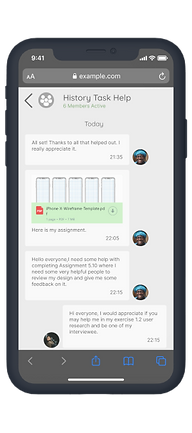
A key component of learning is enthusiasm. Peer-to-peer learning can increase motivation and engagement with a subject. This responsive web app will allow students to connect with others in their field to discuss topics, share insights, receive peer feedback on assignments, and even find others willing to collaborate on projects.
This web app will allow students to engage with a like-minded student community when and where they want and is therefore especially useful for those juggling their studies with a job, family, illness, etc
User Persona

User Stories
"As a new user, I want to find and connect with students studying my subject (or a related subject), so that we may collaborate"
"As a frequent user, I want to be able to message other students, so that we can problem-solve together"
"As a new user, I want to create a profile, so that other students can find me"
"As a frequent user, I want to be able to view and share articles, videos, images, and other files, and write posts for other students to read, so that we can share knowledge"
User Flows

.png)
.png)
Sketches
To initiate the design process, I began by creating multiple rough sketches of the overall layout structure. My objective was to enable the user to switch between navigation features effortlessly, and conveniently access their messages, course updates, and notifications. The sketches displayed below exhibit the same.


Mid Fidelity Wireframes
After finalizing the layout sketch, the next step was to integrate those concepts into wireframes. In order to better understand how the application should be organized, I designed low-fidelity wireframes for the key pages using Figma.


UI Style Guide
The style guide for the Study Together app incorporates a visually appealing and dynamic design approach, characterized by a playful, energetic, and colorful aesthetic, while still maintaining a focused and simple layout and incorporating appropriate design elements.


Click to open StyleGuide

Final Mockups


Responsive Design
After defining three distinct breakpoints, I utilized an adaptive grid system and implemented responsive design patterns to ensure that StudyTogether's interface would adapt seamlessly to screens of varying sizes. Through this process, I was able to create a consistent and functional user experience across all devices.


Takeaways
One of the key takeaways from the StudyTogether UI design project is the significance of reflecting on user research during the design process. By continuously iterating the UI design while keeping the app's main purpose in mind, I designed a platform that facilitates student collaboration, peer-to-peer learning, assignment feedback, and material sharing.
Throughout the design process, the focus was on simplicity, energy, and fostering a sense of community among users. I learned how to effectively incorporate user feedback to refine the design and make it more intuitive and user-friendly.
While the app is not intended to replace traditional classroom instruction, it serves as a digital platform that supports learning and caters to the needs of students with busy schedules. Ultimately, this project taught me the importance of designing with the user in mind and creating a platform that meets their needs and encourages community and collaboration.